 Julien Danjou
GitHub Auto-Merge: When the Native Button Is Enough, and When You Outgrow It
GitHub has had auto-merge since 2021. The native button handles the simple case well. Here’s an honest breakdown of what it does, where it stops being enough, and what to reach for when it does.
GitHub has had auto-merge since 2021. It is a checkbox on the PR. You enable it, the PR merges when required checks pass and required reviews approve, and you stop tabbing back every five minutes to refresh the page. For most teams, that is enough.
For some teams, it is not. This post is the honest version of that comparison: what the native button does, the cases where it works, the cases where it does not, and what to reach for when it stops being enough.
What the native button actually does
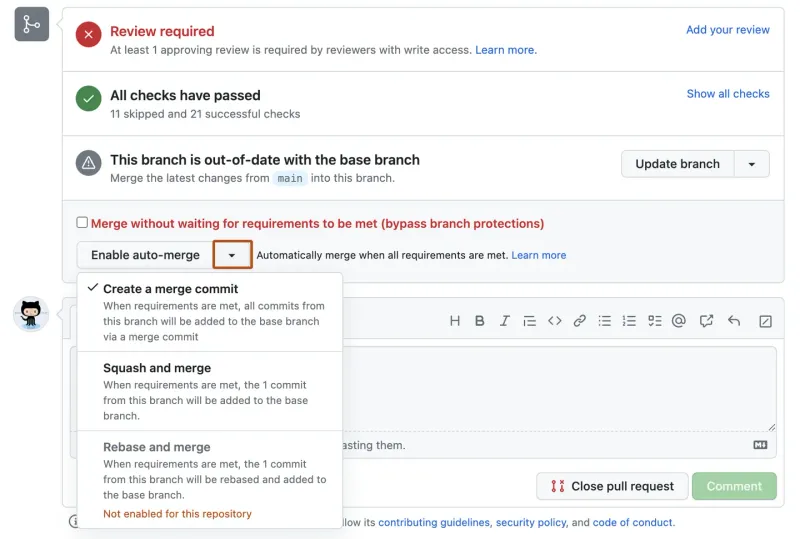
Source: GitHub Docs
The native auto-merge feature is a per-PR setting. You enable it on a pull request via the GitHub UI (above) or the GraphQL API. When all of the following are true, the PR merges automatically:
- All required status checks have passed
- All required reviews have been approved
- No merge conflicts exist
- The PR is not in draft state
You pick the merge method when you enable auto-merge, from whichever methods the repository’s general settings allow. That is the entire feature.
What the native button does not do:
- Apply different success criteria to different PRs (by label, by file path, by author, by size)
- Require anything beyond GitHub’s built-in checks and reviews
- Customize the merge commit message beyond GitHub’s templates
- Coordinate with anything else (release windows, freezes, queues, batches)
If none of those gaps matter to you, stop reading. The native button is the right tool.
When the native button is enough
If your situation matches both of these, save the migration time:
- A single repo where one team owns most PRs and merges fewer than ~10 per day
- A workflow where “all required checks pass and someone approved” is the only thing you ever need to gate the merge on
That is a real and common situation, especially for solo maintainers, startups, and any team that has not yet hit the friction points the native feature was not designed for.
When you outgrow it
The pattern is consistent: teams adopt native auto-merge, ship for a while, and hit a specific gating rule the button cannot model. A few real ones, all about the auto-merge decision itself (we will get to queue and freeze concerns later):
You want to require a specific label before auto-merge fires. A common pattern: auto-merge-ok is added by an internal review bot after a security or compliance check, and only those PRs should land without manual action. Native auto-merge has no concept of labels in its gating.
You want different rules for different PR types. Documentation PRs need one approval. Code PRs need two. Migrations need a database review label. The native button applies the same required-reviews count to every PR in the branch.
You want to require things GitHub does not check. A linked issue, a changelog entry, a specific file pattern, a passing third-party check that is not registered in branch protection. Native auto-merge cannot express these.
You want bot PRs to auto-merge after CI but human PRs to require review. A common ask for Dependabot / Renovate setups. Native auto-merge applies the same review requirement to both, which means either you over-gate the bots or you under-gate the humans. This is the canonical case for rule-based auto-merge: the gating logic is different per author class, and the tool needs to model that.
How Mergify models this
Mergify’s auto-merge lives in Merge Protections. You enable it once at the repo level, then you write rules that scope themselves with an if clause.
The semantic that matters: all rules whose if matches are applied. There is no priority or short-circuit. To give a class of PRs looser or stricter requirements, write mutually-exclusive if conditions so each PR matches exactly one rule.
# .mergify.yml
merge_protections_settings:
  auto_merge: true

merge_protections:
  - name: human PRs need a review
    if:
      - author != dependabot[bot]
    success_conditions:
      - "#approved-reviews-by >= 1"
      - check-success = ci
      - label = ready-to-merge

  - name: dependabot only needs CI
    if:
      - author = dependabot[bot]
    success_conditions:
      - check-success = ci
A human PR matches the first rule; its three conditions must be met. A Dependabot PR matches the second; only CI must pass. The two rules’ if clauses are mutually exclusive, so each PR is gated by exactly one of them.
graph TD
    PR["PR opened or updated"] --> H["Is author dependabot?"]
    H -->|no| H1["Apply human rule (1 review + CI + label)"]
    H -->|yes| B1["Apply bot rule (CI only)"]
    H1 --> Eval["All conditions met?"]
    B1 --> Eval
    Eval -->|yes| M["Auto-merge"]
    Eval -->|no| W["Wait for next event"]
The full condition language is documented in Custom Rules and the Examples page covers the patterns most teams reach for first.
Two more patterns worth knowing
Label-gated auto-merge. Only PRs that have been blessed by a review bot or a manual reviewer should auto-merge. Put the label in success_conditions, not in if — a PR that fails to match any rule’s if would have no gating at all and would slip through:
merge_protections:
  - name: must have ready-to-merge label
    success_conditions:
      - label = ready-to-merge
      - "#approved-reviews-by >= 1"
      - check-success = ci
This rule applies to every PR. A missing label is a failed condition, so the PR sits until the label is added.
File-path-scoped rules. Documentation PRs need lighter approval than code PRs:
merge_protections:
  - name: docs-only PRs
    if:
      - files ~= ^docs/
      - -files ~= ^(?!docs/)
    success_conditions:
      - "#approved-reviews-by >= 1"

  - name: code PRs
    if:
      - not:
          - files ~= ^docs/
          - -files ~= ^(?!docs/)
    success_conditions:
      - "#approved-reviews-by >= 2"
      - check-success = ci
The first rule matches PRs that touch only the docs/ tree. The second rule uses not: to negate the same condition set, which catches every other PR. Mixed PRs (docs + code) match the code rule and need the stricter approval count.
Things that are not auto-merge
Two requests show up next to auto-merge often enough that they are worth naming, even though they are different features:
Schedule freezes. “Block all merges on Friday afternoon” or “freeze main during the release window.” This is not auto-merge logic. Mergify handles it through scheduled freezes, set from the dashboard or CLI rather than a YAML rule. The auto-merge config is unchanged; the freeze pauses the merge action when the schedule says so.
graph LR
    Ready["PR meets all auto-merge conditions"] --> F["Freeze active?"]
    F -->|no| M["Merge"]
    F -->|yes| W["Wait until freeze lifts"]
    W --> M
Batching and queue priorities. “Run CI once for ten PRs instead of ten times” or “let urgent PRs jump the queue.” These need a merge queue, which is a separate Mergify product layered on top of merge protections. If your bottleneck is CI cost or queue throughput rather than the auto-merge rule, see How to Cut Your GitHub Actions CI Bill for the math.
Auto-merge says when a single PR is ready to land. The queue says how multiple ready PRs share CI and merge order. They compose; they are not the same feature.
Migration: not as scary as you think
Switching from native auto-merge to Mergify takes a single repo about an hour:
- Disable native auto-merge in the repository’s general settings
- Install the Mergify GitHub App on the repo
- Commit a
.mergify.ymlwithauto_merge: trueand at least onemerge_protectionsrule
Open PRs continue to behave exactly as before until they match a rule. If something feels off, you can flip auto_merge back to false without rolling back the install.
Common questions
Does Mergify auto-merge work alongside GitHub branch protection rules?
Yes. Mergify's success_conditions sit on top of branch protection. If a check is required by branch protection, Mergify won't merge until it passes — even if your Mergify rule doesn't list it. Use both layers: branch protection as the floor, Mergify rules as the actual gating logic.
Does it respect CODEOWNERS-required reviews?
Yes, indirectly. If your repo's branch protection or ruleset requires a CODEOWNERS review, GitHub blocks the merge until that requirement is met, and Mergify respects that block. Mergify itself does not have a CODEOWNERS-specific condition; the enforcement happens at the GitHub layer.
What's the difference between auto-merge and a merge queue?
Auto-merge gates a single PR: ready or not. A merge queue coordinates multiple ready PRs: order, batching, and how they share CI runs. They compose: auto-merge says when a PR is ready, the queue says how it lands. You can use auto-merge without a queue, and many teams do.
Can I scope auto-merge to a specific branch?
Yes, via the rule's `if` clause. For example, `if: base = main` means the rule only applies to PRs targeting main. PRs targeting other branches don't match and aren't auto-merged by that rule.
Will enabling Mergify break my open PRs?
No. Open PRs only become candidates when they match a rule's `if` and meet its `success_conditions`. Existing PRs continue to behave exactly as before until they match. If you set `auto_merge: true` but the rules are conservative, nothing auto-merges that wasn't going to merge anyway.
How does Mergify compare to Trunk or Aviator for auto-merge?
All three offer rule-based auto-merge that goes beyond the GitHub native button. The differences are in the rule language, the configuration model, and what else the tool ships (queue, freezes, analytics). The merge-queue side-by-side lives at Mergify vs GitHub merge queue and Mergify vs Trunk.
Pricing reality check
Native auto-merge is free, included with every GitHub plan. Mergify is free for open-source projects and small teams; paid plans scale with active contributors. The decision is not really about price for most teams; it is whether you need rule-based gating that the native button cannot express. Once you do, the time saved on manual gatekeeping pays for the seats inside a sprint.
The native feature is great for what it is. It is also explicitly the simple case. If your gating logic has anything past “merge this PR when CI is green and someone approved”, reach for a tool that models the rule instead of working around the button.