 Julien Danjou
How we built stacked PRs without a new git workflow

We wanted small reviewable PRs without making engineers learn a new git workflow. Here is how we built Mergify Stacks: one local branch, a stable trailer that survives every rebase, four git hooks, and unmodified GitHub.
Most stacked PR tools make you live in a graph of branches: one branch per PR, chained together, rebased as a unit when the bottom lands. We spent a year building Mergify Stacks to avoid that. What shipped uses one local branch and a stable trailer borrowed from Gerrit that survives every rebase.
Why stacked PRs are hard to use
The argument for stacking has been settled for years. A 1,000-line PR sits in the review queue for four days, gets an “LGTM” out of reviewer fatigue, and ships a bug that was buried in file 31 of 40. A study of 2,500 reviews at Cisco found review quality collapses past about 400 lines of diff. The Phabricator and Critique workflows at Facebook and Google have been showing the way out for over a decade: split the work and ship small PRs that land in order.
The tooling has been the problem. The space sorted into camps. Tools like Graphite and GitHub’s gh-stack take a branch-per-PR approach: the CLI creates a branch for each PR (gt create, gt modify, gt submit, gt restack) and walks the tree to keep them in sync with main. The bookkeeping is automated, but the mental model is still a stack of branches. Jujutsu (jj) goes further and replaces git outright with a VCS where change identity lives in the data model, an idea also rooted in Gerrit. Both directions work, and both have real users who love them. Mergify Stacks sits in between: borrow Gerrit’s Change-Id pattern, but as a thin layer on unmodified git rather than a new VCS or a branch graph.
We wanted a different deal. Four constraints:
- No new branches to manage. One local branch, like always.
git rebase -istays the editor for stack manipulation. No new commands to learn for amend, reorder, split, or drop.- Unmodified GitHub on the server. No fork of git, no Phabricator-style review host, no server-side plugin.
- Adoption per developer, not per org. One engineer can use the tool while the rest of the team uses plain git, and reviewers see normal GitHub PRs.
The idea: identify changes, not branches
A branch is unstable. You rebase it, the SHA changes, the branch is technically a different thing. What is stable across rebases is the idea of a change. If I write a commit that adds a notifications endpoint, that idea is the same after I rebase, after I split it in two, after I reword it. The SHAs change. The change does not.
Gerrit solved this in 2009 with Change-Id. It is a trailer at the bottom of the commit message (the letter I followed by 40 hex characters), generated when the commit is first created and preserved through every rebase and amend. Gerrit uses it to recognize that two SHAs (one before a rebase, one after) describe the same change.
We took that.
In a Mergify stack, every commit has a Change-Id. The hook that creates it is the same hook Gerrit ships, lightly modified. Every PR in the remote has the short form of that Change-Id embedded in its head branch name. The local-to-remote mapping is by Change-Id, not by branch. Rebases, amends, splits, reorders: the mapping survives them all because Change-Ids do.
What a stack actually looks like locally
A stack is one branch. You start it the way you start any branch:
mergify stack new feat/notificationsYou commit your work in pieces, the way you commit any work:
git add src/models/notification.py
git commit -m "Add notification data model"

git add src/api/notifications.py
git commit -m "Add notification API endpoint"

git add tests/test_notifications.py
git commit -m "Add notification tests"
Each git commit triggers the commit-msg hook. The hook generates a Change-Id from a hash of your username, hostname, date, the commit body, some entropy, and the current HEAD SHA. It inserts the trailer at the bottom of the message. You see it when you run git log:
    Add notification API endpoint

    Change-Id: I7f2a9b3c8e4d1f6a0b2c8d3e7f9a4b5c1d6e8f2a
That trailer is the identity of the change. It does not move when you rebase, amend, split, or reorder.
When you are ready to push, you run mergify stack push. The CLI walks main..HEAD, reads the Change-Id from each commit, and looks up matching open PRs on GitHub by Change-Id. For each commit, it decides what to do: create a new PR, update an existing one, skip because nothing changed, or skip because the PR already merged. The push itself is one atomic git push with --force-with-lease on every branch, so it is all or nothing. The remote ends up with one branch per PR, but you never created those branches locally.
Three commits become three PRs:
graph LR
    C1["commit: notif model<br/>Change-Id: Ia3f9..."] --> PR1["PR #1<br/>head: notif-model--a3f9b1c2"]
    C2["commit: notif API<br/>Change-Id: I2b81..."] --> PR2["PR #2<br/>head: notif-api--2b81c4d6"]
    C3["commit: notif tests<br/>Change-Id: I9c4d..."] --> PR3["PR #3<br/>head: notif-tests--9c4d8e2a"]
    PR1 -- base --> M[main]
    PR2 -- base --> PR1
    PR3 -- base --> PR2
The PRs are chained because each one’s base branch is the previous PR’s head branch. The Change-Id suffix on each remote branch is how mergify stack push finds the PR again next time you push.
Editing the stack is just git rebase -i
This is the part that surprises people who have used branch-per-PR tools. There are mergify stack subcommands that wrap common rebase operations (more on why in the AI section below), but the default editor for stack manipulation is the one you already know:
git rebase -i mainYou mark a commit edit to fix it, reword to rename it, squash to fold it into the previous one. Delete a line to drop a commit, move a line to reorder. When the rebase finishes, every commit has a new SHA. The Change-Ids are unchanged, because they live inside the commit message and rebase preserves the message.
graph TB
    subgraph Before["Before git rebase -i"]
        direction LR
        B1["SHA abc1<br/>Change-Id Ia3f9"] --> B2["SHA def4<br/>Change-Id I2b81"] --> B3["SHA 789a<br/>Change-Id I9c4d"]
    end
    subgraph After["After git rebase -i"]
        direction LR
        A1["SHA 111a<br/>Change-Id Ia3f9"] --> A2["SHA 222b<br/>Change-Id I2b81"] --> A3["SHA 333c<br/>Change-Id I9c4d"]
    end
    P1["PR #1"]
    P2["PR #2"]
    P3["PR #3"]
    Before -->|"SHAs change, Change-Ids do not"| After
    A1 -.->|by Change-Id| P1
    A2 -.->|by Change-Id| P2
    A3 -.->|by Change-Id| P3
You run mergify stack push again. The CLI sees the same Change-Ids, finds the same PRs, and force-pushes the new commits to the existing remote branches with --force-with-lease. The PRs update in place. Reviewers see the new diff on the same PR they were already reviewing. If they want to see what changed across rebases, our free browser extension adds a revision timeline to the PR page, so the diff between any two revisions is one click away.
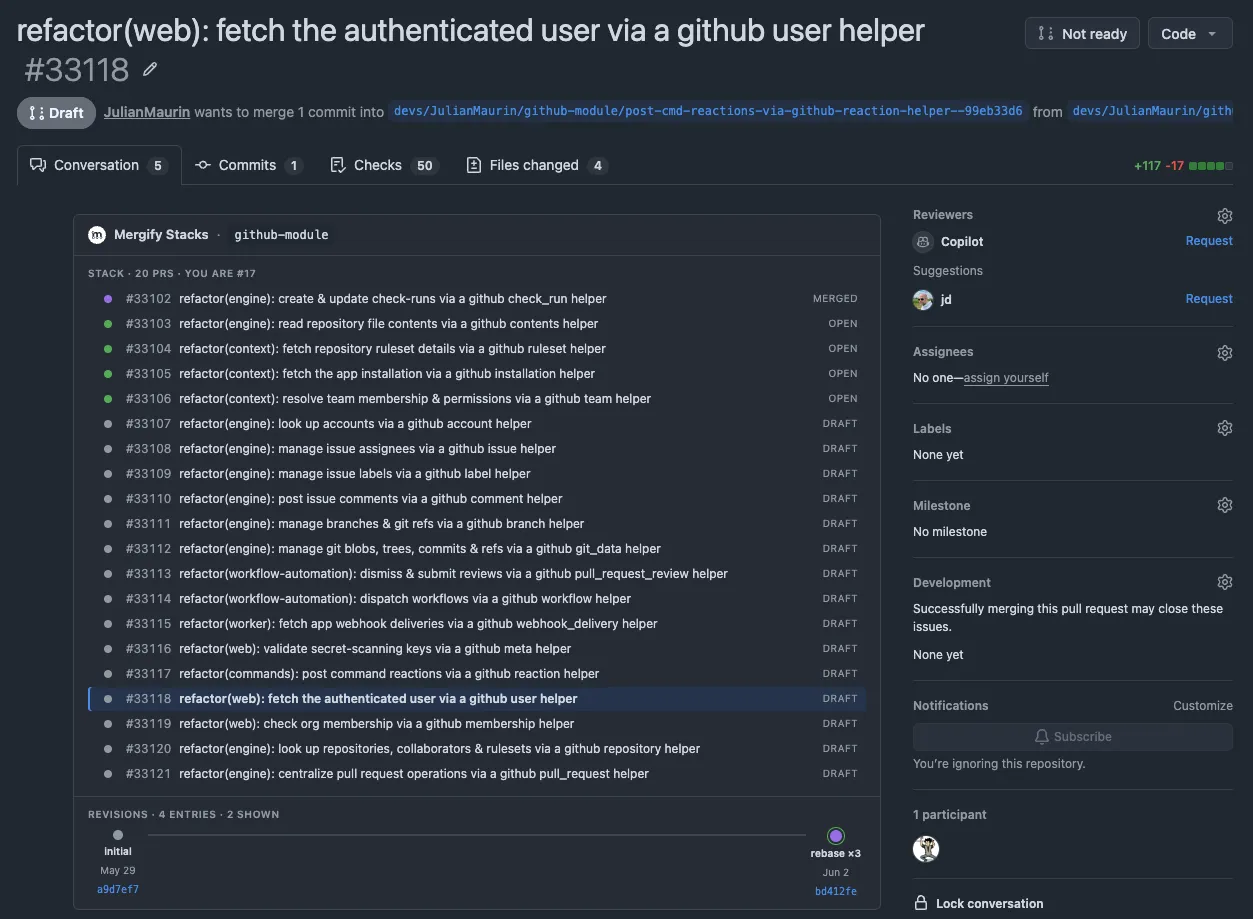
The screenshot above is from a 20-PR stack on our own monorepo, with the extension panel rendered inside the real GitHub PR page. A stack this size is how we build a large feature or refactor: one chain of dependent PRs that lands bottom-first, each small enough to review on its own. The panel at the bottom is the revision timeline for the highlighted PR (#33118), showing each force-push as a clickable revision with a label and SHA.
How this differs from Graphite, gh-stack, and jj
Graphite and GitHub’s gh-stack take a branch-per-PR approach. The CLI creates a branch for each PR and tracks the parent-of relationship between them. When one PR merges and the next has to rebase onto main, the tool walks the tree and rebases each downstream branch in turn.
The tradeoff is real. Branch-per-PR gives you a stable artifact for each PR locally (the branch), which makes it easy to check out and test a single PR in isolation. The cost is the tree: even with gt sync cleanup, the mental model is a stack of branches that the tool manages on your behalf. Reordering PRs means reordering branches.
Jujutsu (jj) is the closest cousin to what we built. It takes the same Gerrit-inspired idea (change identity that survives rewrites) and pushes it into the VCS data model itself, with first-class conflict storage and automatic descendant rebasing on top. Where we diverge: jj is a whole VCS that the team installs (even in colocated mode, you live in jj commands daily). Mergify Stacks is four git hooks and a CLI on top of unmodified git. If you can move a team to jj, jj is likely the cleaner answer. If you cannot, this is.
The Mergify approach trades the branch tree for git history. You get the linear view back: git log shows your stack as a list of commits, top to bottom, with the bottom landing first. You get git rebase -i back as the editor for everything. You lose the ability to git checkout pr-3 locally, because PR 3 has no local branch (the remote branch exists, you can fetch it if you need to). For us that was the right trade.
There is a second, less visible difference. Stacks at scale are a serialization problem: with four PRs stacked behind a 200-engineer monorepo, by the time PR 1 lands, main has moved enough that PR 2 needs a rebase, and so on, and you have a 30-minute window during which any of them can collide with someone else’s merge. Branch-per-PR tools like Graphite ship their own merge queues to solve this, but using one means adopting the rest of that vendor’s workflow. Mergify decouples the two: stacks work without our merge queue, and the queue works without stacks. Pair them and the queue is stack-aware: you can queue the whole stack in one command, and it can batch multiple stack PRs into the same tested merge, landing them together when CI allows.
An accidental fit for AI agents
This was not the use case we designed for. It may be the best one.
A coding agent given “build a notifications feature” can plan the work as a series of commits, each one a reviewable PR. Reviewer feedback maps to a specific commit; the agent re-runs git rebase -i to edit that commit and mergify stack push to update the PR. Agents drive git rebase -i cleanly (humans have been driving it badly for fifteen years), and the rest of the mergify stack surface (new, push, edit, sync, list) is small enough to wrap as a Claude Code skill or a Cursor command, which is what we are doing.
The accidental win: agent-authored PRs become reviewable. A 1,000-line agent-generated PR runs into the same review-fatigue problem human-authored ones do, with the added penalty that nobody trusts AI output enough to LGTM a wall of code. Splitting the work into commits gives the reviewer something they can evaluate one piece at a time, and gives the agent targeted feedback channels instead of one comment dump on a monolith.
Try it
Mergify Stacks is open source and the CLI is on GitHub at Mergifyio/mergify-cli. You do not need the Mergify GitHub App installed on your org to use it: the CLI creates and updates PRs directly against GitHub with your own token. Install uv (a one-liner on any OS), then:
uv tool install mergify-cli
cd your-repo
mergify stack setup
That last command installs the four hooks and configures local git notes. From then on, every commit on a non-main branch gets a Change-Id, and mergify stack push does the rest.
Full docs at docs.mergify.com/stacks. If you have read this far, the only thing left is to try it on a real branch and decide whether git rebase -i plus a Change-Id are enough. For us they have been.